Unlock Your Phone's True Gaming Power

Boost FPS, reduce lag, and improve battery efficiency with real-time CPU & GPU optimization.
Prediction Boost: Pro Gamer for Android improves FPS by stabilizing performance, reducing frame drops, and increasing sustained CPU power during gameplay. Major increase in responsiveness.
About Prediction Boost: Pro Gamer Android
Prediction Boost: Pro Gamer is a real-time performance engine designed to optimize your phone while you
play. It intelligently adjusts CPU and GPU behavior to deliver smoother gameplay, faster response times, and longer sessions - without overheating or draining your battery.

Modes
Max Mode
Up to +50% higher CPU performance when it matters most.
Maximizes processing power for the fastest response times, reduced input delay, and peak in-game performance.
What it does:
• Higher sustained CPU frequency
• Faster thread scheduling
• Instant response under load
Game Mode
Balanced performance for smooth, consistent gameplay without unnecessary power spikes.
What it does:
• Stabilizes CPU & GPU workload
. Reduces frame drops and jitter
• Maintains steady performance during long sessions
Battery Mode
Extend your playtime with intelligent power management.
What it does:
• Reduces unnecessarv CPU spikes
Improves efficiency per frame
• Keeps gameplay smooth while lowering power draw


Real Results

Prediction Boost: Pro Gamer is built on real device telemetry not guesses.
Typical improvements:
Lower input delay
Higher sustained performance
Improved battery efficiency
Reduced power spikes and overheating
Real Results
Prediction Boost: Pro Gamer uses a predictive optimization engine that monitors your device in real time.
• Analyzes CPU & GPU load
• Detects gameplay intensity
• Applies dynamic performance tuning
• Adiusts instantly as conditions change
Performance Logging
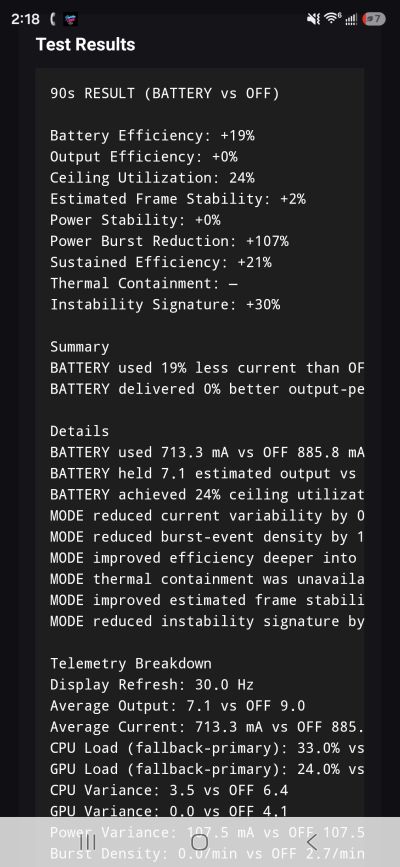
Prediction Boost: Pro Gamer includes built-in performance logging so you can see how your device responds in real time.
Performance Logging records device telemetry such as CPU activity, GPU activity, battery current, frame timing, jitter, and estimated efficiency while Predictive PowerScope is running
This helps show how each mode performs compared to normal device behavior.
What Performance Logging Tracks
CPU usage and sustained performance GPU load and stability Battery current and efficiency Frame timing and jitter Power spikes and thermal behavior Mode comparison results
Why It Matters
Performance Logging gives you real test data instead of guesses.
You can compare OFF mode, Game mode Battery mode, and Max mode to see how GameBoost affects responsiveness, power use and stability.
Real Device Testing
Predictive PowerScope is tested using live telemetry from actual devices
Results may vary depending on your phone game, battery level, temperature, background apps, and device settings.
We offer comprehensive product testing and quality assurance services to ensure that your software meets the highest standards. Our team of experts is dedicated to providing effective testing solutions.
Simple Explanation
Performance Logging helps prove what Predictive PowerScope is doing by showing real numbers from your device while you play.